


It’s the 90th minute of a Weekend League game, your thumb is sweating like a sinner in church, and your 99-rated striker just sent a sitter into Row Z. You blame the 'scripting,' you blame EA, and you probably consider throwing your controller into the nearest body of water.
But before you think of retiring from the digital sport, let’s talk about your controller settings. Most of you are out here playing with the most basic setup while your opponents are using pro-level settings. To help you stop being a certified yapper during the loading screen and actually start winning, we’ve combined all the information we could gather from the web to give you the best EA FC 26 controller settings.
1. Shooting : Aim Like You Mean It
To truly understand how to score in FC 26, you have to realize that EA Sports basically just staged a coup against the old guard of players. For years, the secret to being a pro was a mechanic called Timed Finishing. It was essentially a rhythm-based cheat code where you would tap the shoot button once, then tap it again at the exact micro-second your player’s boot touched the ball. If your timing was perfect, the ball would glow green and fly into the top corner like a heat-seeking missile. It didn't matter as much where you aimed because the "Green Time" did the heavy lifting for you.
Advertisement
But in FC 26, that safety net has been completely deleted. As YouTuber ‘The Guide’ points out in their tutorials, if you try that old double-tap trick now, you won’t get a miracle goal. Instead, you will just perform a "Low-Driven" shot that rolls weakly along the grass. The Green Glow is gone, and in its place is a much more demanding system called Precision Shooting.
Advertisement
Think of this transition like moving from a self-driving car to a high-performance stick shift. Earlier, the game's Assisted setting would guesstimate where you wanted to shoot, correcting your shaky aim so you would at least hit the target. Now, with Precision Shooting, the training wheels are off. You are in total control of the crosshairs. If you point the stick even a fraction too far to the left, you aren't just missing the goal; you're hitting the guy selling hot dogs in the stands.
This is why Redlac and Jamboo FC are telling everyone to change their settings immediately. While the old way was about timing, the new way is about accuracy. By switching your controller setting to Precision, you unlock the ability to pull off those impossible shots into the tiny gaps near the post that the standard Assisted mode would never allow. It is EA's way of forcing everyone to actually learn how to aim. It is frustrating for the first few games, but once you master it, you realize the missile isn't gone. You just have to be the one steering it now.
Advertisement
This shift is why experts like NealGuides suggest that casual players might actually struggle more this year. If you find yourself sending sitters into Row Z, it is likely because your Precision aim is off. But for those willing to put in the practice, this setting is what separates the elite from the players who are just yapping during the loading screens.
2. The Defense : Shoulder Barges & Broken Backs
If you want to see a gaming community tear itself apart, just ask about the choice between Advanced and Tactical Defending. Earlier, most players stuck to the classic Tactical setting because it was safe. In that older system, you basically just pressed one button and the game’s 'brain' decided whether your player should attempt a standing tackle or just bump into the opponent. It was the "automatic car" of defending, where the AI did most of the heavy lifting while you just steered.
The 2026 update has made Advanced Defending the new pro standard. This shift happened because of a specific mechanic called the 'Seal Out.' In the current meta, players with the Bruiser PlayStyle+ are essentially walking tanks. If you switch your settings to Advanced, you gain a dedicated button just for physical confrontation. While the standard tackle button still exists, you can now press X or A to manually body-slam an attacker and step directly in front of them to steal the ball. It is a legal way to RAM-os opponents off the pitch without the referee reaching for a whistle.
The problem is that this creates a high-stakes trade-off. In the older Tactical system, if you mistimed a button press, the AI usually helped you recover. But with Advanced Defending, you are in total control. As NealGuides points out, this is a high-skill and high-stress way to play. If you panic and press the barge button when you should have tackled, your defender might just launch into the air like a confused NPC, leaving a massive hole in your backline.
For the average player, this choice is definitely a tricky one. You have to decide if you want the 'Elite Edge' that comes with manual physical control or the safety of the AI 'Auto Mode.' If you are tired of being pushed around by strong strikers, learning the Advanced setting is your best bet. But if you aren't ready to play a game of finger-twister, you are better off staying with Tactical and letting the game's brain handle the dirty work.
3. Passing : The Last-Second "Wait, Not Him!" Toggle
Passing in FC 26 is like trying to text your ex; if the timing is off, it’s a disaster.
Passing in FC 26 has become a game of high-stakes timing where a single mistake can turn a counter-attack into a disaster. Earlier, many players didn't give much thought to a setting called Pass Receiver Lock, but in the current 2026 meta, it is the most important toggle in your menu. If you have this set to 'Early', FC IQ decides who you are passing to the exact millisecond you tap the button. If a defender steps into that lane while your player is still winding up their leg, you are almost guaranteed to watch a slow-motion interception with no way to stop it.
This is why we insist on switching this setting to Late. By doing this, the game waits until the very last possible frame before the ball leaves the foot to lock onto a teammate. This change gives you a split-second window to realise that your original target is covered and flick the stick toward a different player instead. It is the ultimate strategy for those moments when you realise you almost made a terrible decision.
When it comes to the actual types of passes, you have to balance your 'style' energy with cold, hard reality. For standard Ground Passes, the pro consensus from The Guide is to stay on Assisted. There is no reason to try and be a manual-aiming hero here, FC IQ is incredibly good at finding your teammate's feet, and trying to do it yourself just adds unnecessary stress to your build-up play.
However, for Through Balls and Lob Passes, the 'Full Assisted' setting is often your worst enemy. Earlier, players found that the FC brain would frequently ignore a wide-open winger and instead force the ball toward a striker who was being triple-teamed. By switching these to Semi, you take back control of the power and direction in general. It requires way more focus, but it makes sure that when you see a brilliant run, the ball actually goes into the space you intended instead of where the game's 'SAFE LOGIC' thinks it should go. Using these settings is the best way to ensure your passing feels like a breeze.
4. Switching : The Anti-Panic Player Selection Guide
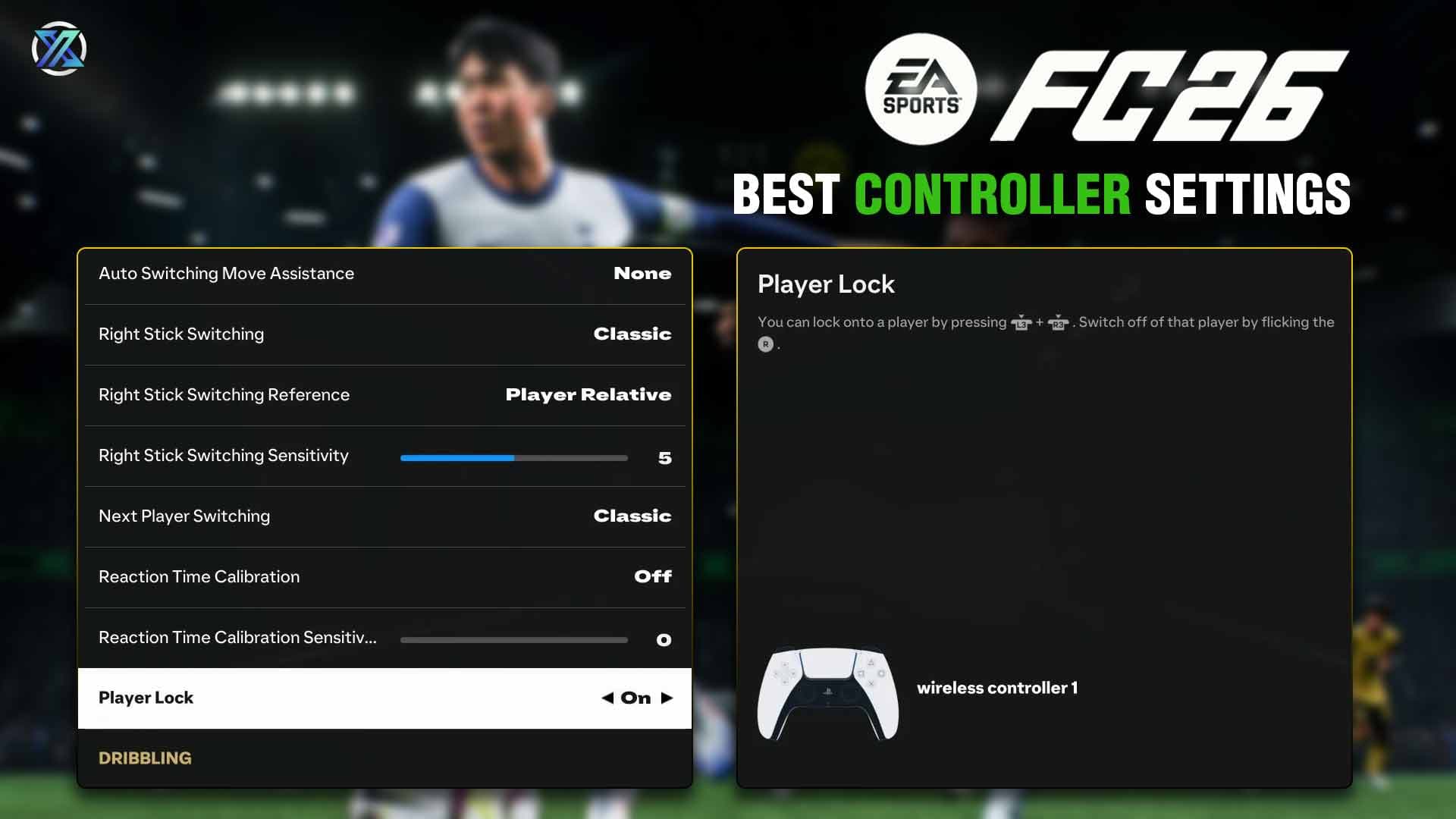
If you’ve ever tried to switch to your Center Back to stop a breakaway but ended up controlling your Striker while the opponent walked into your box, your switching settings are likely the culprit. In the older days, player switching felt like a game of chance, but in the 2026 meta, it has become a science of Ping-to-Sensitivity ratios. The most important setting here is Right Stick Switching, and the key is to always keep this on Player Relative.
Earlier, some players experimented with 'Ball Relative' switching, but that is a dangerous choice because the ball is constantly moving. By keeping it Player Relative, your currently selected player acts as your fixed anchor. If you want to switch to the defender to your left, you flick left. It is consistent, predictable, and keeps you from feeling like you are chasing a ghost across the pitch.
The secret sauce for 2026 is the Sensitivity slider. Think of this like the steering in a race car. If the sensitivity is too high, a tiny flick of the stick might send your cursor flying to a player on the other side of the stadium. We suggest starting at a 4 or 5 because it prevents the game from overthinking your thumb movements. This is the sweet spot for most players because it balances speed with actual control.
However, remember that your internet connection plays a massive role here. If you are blessed with a 10ms ping and have the reflexes of a Jedi, you can afford to bump that sensitivity up for lightning-fast transitions. But if your internet is slow, a high sensitivity will actually hurt you real bad. In high-lag situations, you should actually drop the sensitivity down to 2. This prevents 'input overshoot,' which is that frustrating moment where the game processes your flick a split-second too late and switches you to an entirely different person. Mastering this ratio is the only way to ensure you are always in control of the right player at the right time.
5. The ‘No-Fly Zone’ (Settings to Kill Immediately)
If you still have these specific settings turned on, you aren't playing EA FC 26, you are playing a horror game where you are the victim. Earlier in the series, players loved the immersion of feeling a controller vibrate or having the triggers get 'heavy' as players got tired. But in the high-stakes world of FC 26, those features are actually sabotaging your experience. Here's what we think - if you want to win, you have to kill the "fluff" settings immediately.
The biggest offender is a setting called Analog Sprint. In older games, this was meant to be realistic because the harder you pressed the trigger, the faster your player would run. In theory, it sounds great, but in a 2026 counter-attack, 'half-speed' is a death sentence. By turning Analog Sprint OFF, you ensure that your player hits 100% of their top speed the moment you touch the button. There is no guesswork and no delay, you just RUN, FOREST...RUN!.
Then there is the issue of Trigger Effects and Vibration. Earlier, these were marketed as 'next-gen' features that let you feel every tackle and every tired muscle. But you do not need your controller fighting back against your fingers while you are trying to defend a one-goal lead in the 88th minute...do you?. Vibration is a distraction that ruins your muscle memory, and trigger resistance just makes your hands tired. Turning these OFF saves your battery, saves your hands, and keeps your focus entirely on the pitch instead of a buzzing piece of plastic.
Finally, you need to make sure Professional Fouls are toggled ON. Earlier, if an opponent was sprinting past your last defender, your only choice was a risky slide tackle that usually resulted in a red card. Now, you have a dedicated 'tactical' option. By pressing R1 and X (or RB and A), your player will simply grab or pull the opponent down. It is a cynical, calculated way to stop an attack. You will get a yellow card, but as any seasoned player will tell you, a yellow card is a small price to pay for channelling your inner Sergio Ramos and living to fight another minute.
6. The 2026 Secret : "Rush" Mode Logic
Finally, we have to talk about Rush Mode. This 5v5 playground is the breakout star of FC 26, but because the pitch is so much smaller and the pace is twice as fast, your standard 11v11 settings will make you look like an absolute noob. Earlier, players would just jump into smaller modes with their default camera and switching logic, only to realize that the 'zoom' was all wrong and they couldn't see their teammates making runs.
The first thing you need to fix is your Camera. In the standard game, many pros swear by a 'Co-op' view because it lets you see the entire field at once. However, in Rush, that same setting makes the players look like tiny ants, making it nearly impossible to time a precise tackle or judge the distance for a 'Seal Out.' Switching to a Tactical camera for this mode is the sweet spot. It keeps you close enough to the action to win your 1-on-1 duels, but wide enough that you can still see the passing lanes before they close.
The second - and perhaps most vital change - is your Auto-Switching logic. Earlier, you might have relied on AI to help you swap players when the ball changed hands. But in Rush, the ball moves around so quickly that the game's 'assisted' logic often zones-out. It might switch you five times in three seconds, leaving you controlling a defender who is miles away from the action while the opponent walks into an open net.
By moving this to Manual, you take full responsibility for who you are controlling. It sounds intimidating, but it is the only way to ensure you are actually tracking the runner you were planning to. Rush is about individual responsibility. If you let AI decide who you are playing as, you are basically letting FC IQ play half the game for you - and in a 5v5 match, that almost always ends as a disaster. Mastering these Rush-specific tweaks is the real 'pro move' to ensure you aren't just a passenger in the fastest mode in the game.
OrbeatX Verdict
Now go out there and try your best not to turn your controller into a pile of expensive plastic shards.
If you follow these settings and still manage to lose, just remember the golden rule of the community :
It is never your fault, it is always a 'scripting' conspiracy that goes all the way to the top.
So take these tweaks, hit the pitch, and try to look like you have actually played a game of football before. If all else fails and you find yourself losing in the final minute, just take the hint, close the app, and go check the virtual farms on your mobile. At least the vegetables won't feel scripted.